Automate your maintenance. Give your frontline teams AI superpowers.
Fewer unplanned stoppages — report, repair, and follow up in one app.
Report issues, assign work, automate preventive maintenance — for plants, buildings and assets. Start instantly.
Reporters are always free No credit card Start instantly
GDPR-compliant Hosted in the EU Made in Germany ISO-audit-readyTrusted by leading companies






Built for the teams that keep things running
The maintenance loop
Something broke. Now what?
Most plants still run this on spreadsheets, paper, and WhatsApp groups — so the same pump fails again, and nobody remembers how it was fixed last time. 5thIndustry makes the whole loop structured and searchable.
Open the asset, snap a photo, submit.
It lands on the board, prioritised and assigned.
Tech works the checklist, logs parts used.
Every change saved to the asset's timeline.
AI surfaces similar past incidents so the same thing doesn't bite twice.
From spreadsheet to system
Stop running maintenance in Excel.
Maintenance plans live and die in spreadsheets — until a due date slips, a tab gets overwritten, or the one person who understood it leaves. Here's the same plan as a system that reminds you, keeps the history, and holds up in an audit.
| Asset | Task | Last | Next due | Status |
|---|---|---|---|---|
| Pump P-12 | Seal check | 12.01 | 12.03 | Overdue |
| Line 3 conveyor | Belt tension | 28.02 | 28.04 | ?? |
| Compressor C-4 | Oil change | 05.01 | 05.02 | Overdue |
| HVAC roof unit | Filter swap | 10.03 | 10.06 | OK |
Overdue dates you only spot by scrolling. No reminders. No history.
- 12.01 — Seal check completed · 2 parts logged
- 04.12 — Vibration reported · repaired
- 18.10 — PM completed · checklist 8/8
Automatic reminders, a full asset history, and an audit trail on every change.
14-day free trial · no credit card · live in a day
Report & triage
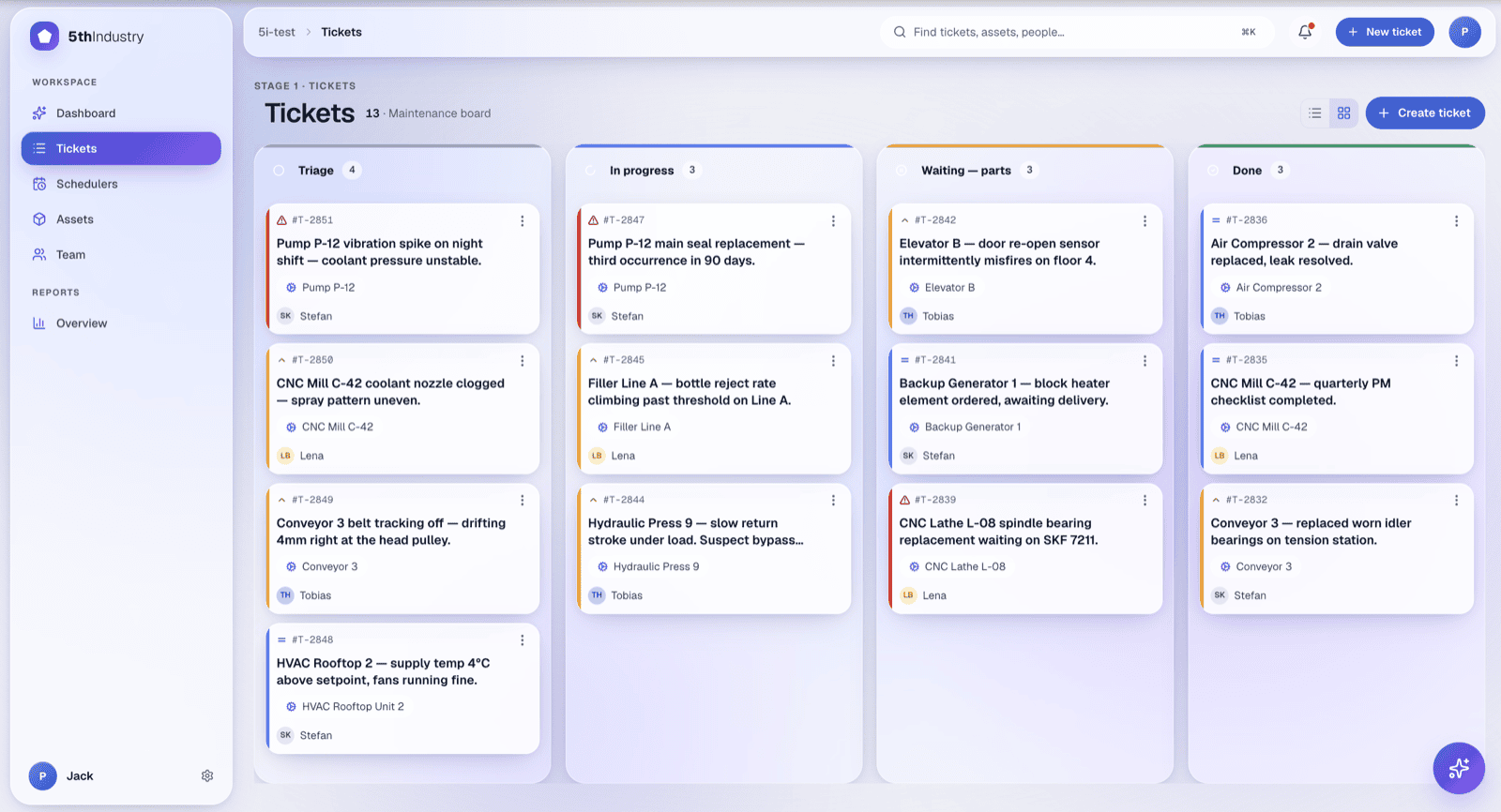
From the floor to assigned — in one board.
Operators report in seconds. Planners see the whole queue at a glance. No more “did anyone pick this up?”
Report in under 30 seconds. Pick the asset, attach a photo, submit. Reporters never use a paid seat.
Kanban, or your own buckets. “Triage”, “Waiting — parts”, “QA” — your columns, mapped onto four canonical states.
Filters that stick. Save a board view per team, asset, or priority — it's there the next time you open the page.
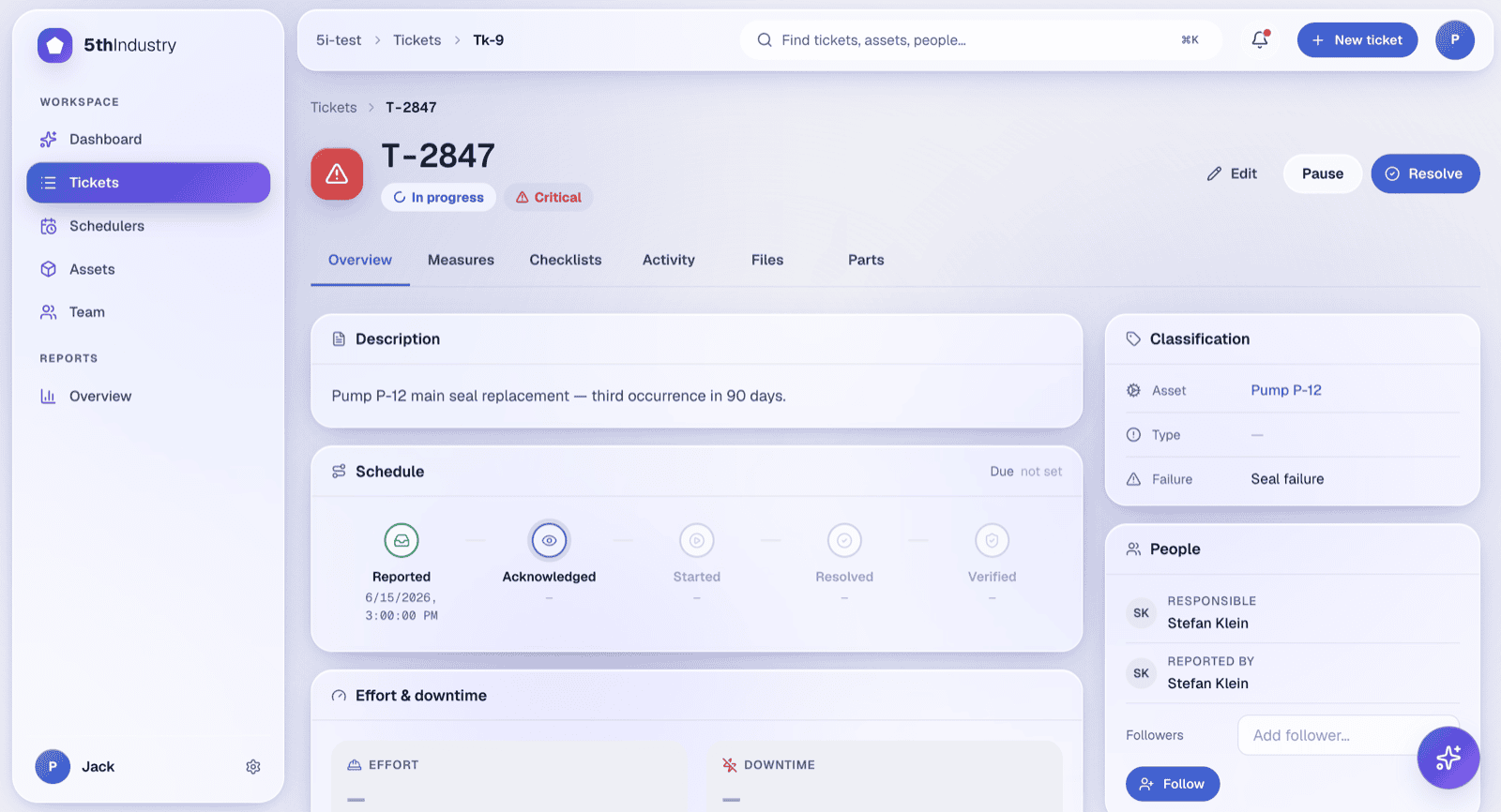
T-2847 has 3 similar tickets in the past 90 days — likely the same root cause on the main seal.
AI assistant
Ask how to fix it. Ask what's failing.
Not a generic chatbot bolted on. The assistant is grounded in your data — manuals, photos, documents, and the history of every machine.
“How do I fix this?” Answers pulled from the asset's own manuals and similar past tickets — not the open internet.
Ask your data anything. “Which asset failed most on Line 3 last month?” — answered against your records, with a “How I computed this” breakdown.
Only your data. Nobody else's. Every AI request stays inside your organization and is checked on our servers. Your manuals and ticket history are visible to you and the assistant — no other customers, no open internet.
Reports & reliability
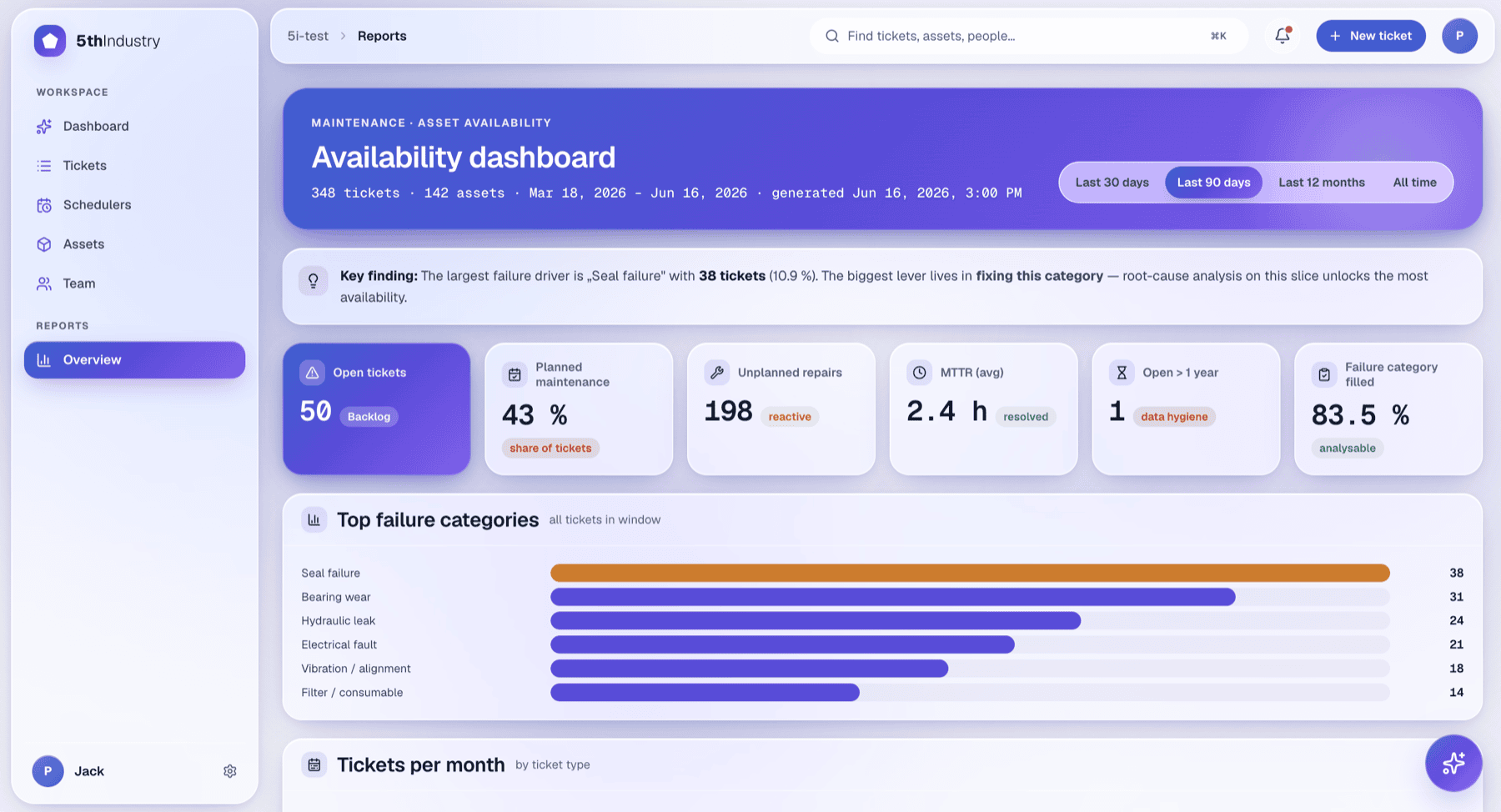
Know your MTTR before your auditor asks.
Fixed dashboards for the four numbers that matter, ad-hoc analytics for everything else, and a CSV export on every list view.
One system, not five tools
Everything that runs your maintenance
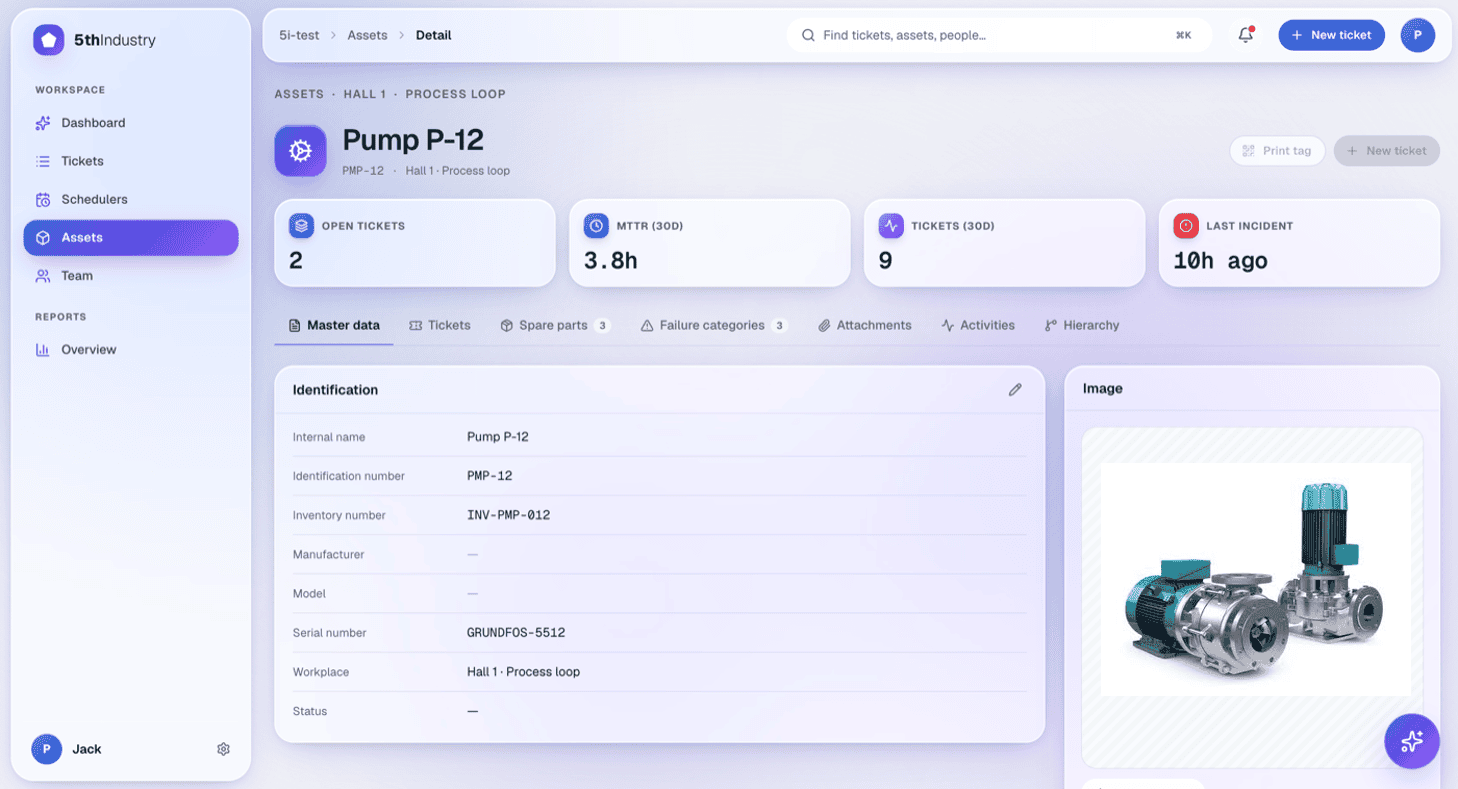
Asset hierarchy
Unlimited-depth trees, lazy-loaded. Re-parent assets, inherit grouping, manage docs per node.
Recurring schedulers
Time-based (“every 1st Monday”) or counter-based (“every 10,000 cycles”). PM tickets create themselves.
Spare parts & inventory
Material masters, stock by location, min/max levels. Consumption logs against the ticket automatically.
Checklists
Step-by-step procedures on any ticket. Templated for scheduled PM so work is done the same way every time.
Audit-ready activity log
Every create, update and delete on every entity, recorded. The trail ISO reviewers and downtime reports need.
Files that the AI reads
Manuals, photos and documents are vectorised in the background, so the assistant can retrieve them later.
Who it's for
Built for your floor, your buildings — or your grid
Production & manufacturing
Coordinate shift handovers, cut unplanned downtime, and keep a history on every machine on the line.
Facility management
Run buildings and infrastructure from one dashboard. Assign work to in-house teams or external contractors.
Energy infrastructure
Maintain distributed assets — substations, generation, storage — with proof of every recurring inspection.
Quick start
Live in a day, not a quarter
Set up your org, register your first few assets, and watch the first ticket land. No long implementation projects.
Set up your org
Create your organization, set working hours and locale, and invite your team.
Add your assets
Register equipment, upload manuals, and link spare parts.
Watch the first ticket land
Raise a ticket and see it hit the board. That's the loop running — your team is live.
Pricing
Pay for maintainers. Reporters are free.
The more people reporting problems, the more value you get — so we never charge for it. You only pay for the people doing the fixing.
Basic
The core CMMS for teams getting off spreadsheets.
Standard
Everything in Basic, plus the AI assistant.
Advanced
For teams pushing toward predictive maintenance.
14-day free trial on full Advanced — every seat, no AI caps. Top up anytime with one-time AI credit add-ons.
FAQ
Frequently asked questions
What is a CMMS?
A CMMS — Computerized Maintenance Management System — turns the maintenance loop (report → triage → repair → record → learn) into one structured system around your assets. Tickets, asset history, schedulers, spare parts, an audit-ready activity log, and reports — all in one place.
Can it replace our Excel maintenance spreadsheets?
Yes — that's exactly what most teams switch from. Instead of a spreadsheet someone has to remember to check, your maintenance plans become recurring tasks that create themselves and remind the right person. Every asset keeps its full history, overdue jobs surface automatically instead of hiding in a row, and every change is logged for audits. You start from how you already work in Excel — assets, tasks, due dates — and it's live in a day. No more "(final)(v3)(USE THIS).xlsx".
How fast can we get started?
Same day. Sign up, set working hours and locale, invite your team, register your first few assets, and raise the first ticket. No long implementation projects.
Is there a free trial?
Yes — 14 days on the full Advanced tier, every seat, no AI caps. No credit card. Cancel anytime.
Does it work on mobile devices?
Yes. The web app is responsive and works in any modern mobile browser. Dedicated native iOS and Android apps are on the roadmap.
What languages are supported?
English and German at launch. More languages are on the roadmap.
How does pricing work?
Reporters — the people who only file tickets — are always free. You pay per maintainer seat on one of three tiers: Basic, Standard, or Advanced. The AI assistant runs on a monthly fair-use quota per Standard/Advanced seat, with one-time credit packs available for overflow.